Mise à jour: Ce clavier fonctionne toujours sous OS X 10.9 Mavericks. Il se trouve dans la catégorie “Autres” des méthodes de saisie.
Update: This keyboard layout still works with OS X 10.9 Mavericks. You can find it in the “Others” category of keyboard layouts. I have also put it on github.

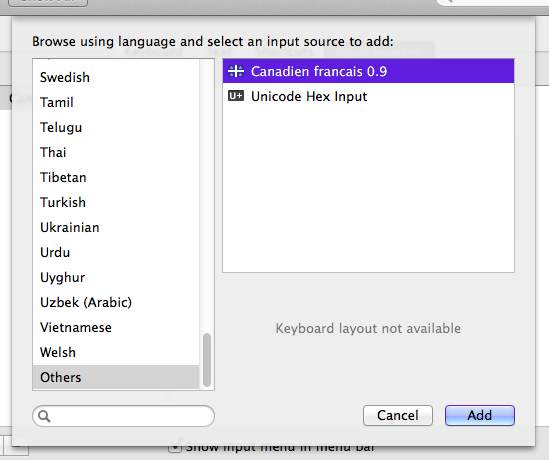
This used to be on my googlepages page, but apparently that’s going to be shut down, so here it is now.
Download from Github (updated version with  and Ô thanks to joallard)
Download, unzip and stick the two files (cf.icns and cf.keylayout) in /Library/Keyboard Layouts. Then go to System Prefs, International (Language and Text for Snow users), Input Menu and check off “Canadien Francais 0.9”. (You may need to log out and back in before the new layout appears in System Preferences).
I did NOT make this keyboard layout, I found it somewhere on the web but the original site is now gone.
Voici le clavier Canadien francais pour Mac OS X. C’est l’équivalent du clavier “Canadian French” ou Français (Canada) sous Windows. Pour installer, télécharger le fichier .zip depuis github, décompresser, et copier les deux fichiers (cf.icns et cf.keylayout) dans le dossier /Library/Keyboard Layouts.
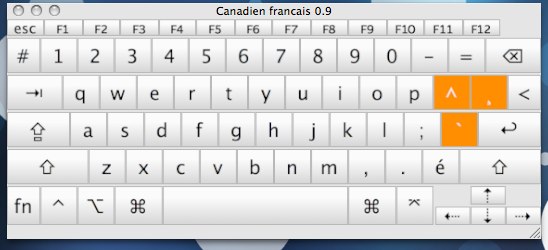
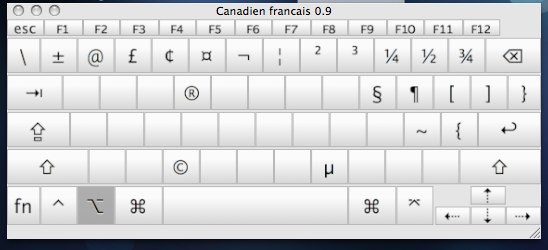
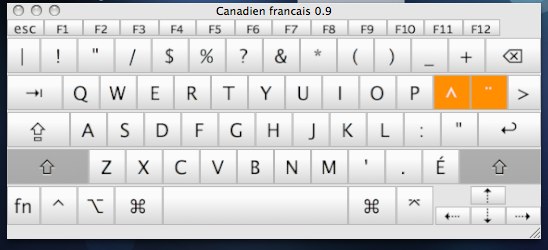
Here is the actual keyboard layout screenshot:
2009-09-12 at 20:16
Je voulais simplement te remercier pour ton excellent travail, j’ai cherché longtemps avant de trouver ce “layout” sur ton site. Tu as fait ma journée.
Merci 🙂
2009-09-23 at 18:58
Thanks for posting this keyboard, I desperately need it, being a windows switcher. However, after installing it and selecting it, the keys show in the right positions in the “keyboard viewer” but when I press keys in a text processor, no text appears. It’s like the keyboard becomes inactive.
Heard of that bug before? were u able to make it work on ur mac?
Using snow leopard here.
Thanks for any help you can provide. I’m just unable to get used to the other Canadian French keyboard. Years of reflexes… Can’t help it.
2009-09-23 at 22:55
Haven’t got Snow Leopard yet, but I had to log off and log on before the keyboard layout worked properly in 10.5.8.
2014-03-22 at 11:47
Mozilla/5.0 (Macintosh; Intel Mac OS X 10.6; rv:16.0) Gecko/20100101 Firefox/16.0
Hello, I have just updated my 10.5.8 to 10.6.3, and the keyboard layout works in general, but NOT in word for mac 2004, which is the app I need most. I did not install the optional French module (enabling you to ‘translate’ osx and use it in French) when I did the update, could this be an issue? Any thoughts would be really helpful, I am desperate! Thanks!
2014-03-22 at 12:12
Mozilla/5.0 (Macintosh; Intel Mac OS X 10.6; rv:16.0) Gecko/20100101 Firefox/16.0
FALSE ALERT! For those who could be interested in the “problem” I’ve just described, despair not (as I did…)! This just got solved! I trashed the 2 files (cf.keylayout & cf.icns) from the keyboard layout folder, then downloaded them from here, and put them back in the keyboard layout folder. Rebooted and voilà, all works again! MANY thanks for the layout, and best of luck to all with this!
2010-01-09 at 14:04
Mozilla/5.0 (Macintosh; U; Intel Mac OS X 10_6_2; en-us) AppleWebKit/531.21.8 (KHTML, like Gecko) Version/4.0.4 Safari/531.21.10
Thank you VERY much my friend!!! It’s working great!
2010-11-15 at 15:29
Mozilla/5.0 (Macintosh; U; PPC Mac OS X 10.4; en-US; rv:1.9.2.12) Gecko/20101026 Firefox/3.6.12
Merci Matthieu, c’est ce que j’avais de besoin.
éÉèàç
2010-01-17 at 10:36
Mozilla/5.0 (Macintosh; U; Intel Mac OS X 10_6_2; en-US) AppleWebKit/532.5 (KHTML, like Gecko) Chrome/4.0.249.49 Safari/532.5
Thanks for that! I was getting crazy trying to adapt to the Mac’s CSA keyboard layout. I use Windows at work and didn’t want to have to have to learn yet another layout!
2010-11-07 at 23:13
Mozilla/5.0 (Macintosh; U; Intel Mac OS X 10_6_4; en-US) AppleWebKit/534.7 (KHTML, like Gecko) Chrome/7.0.517.44 Safari/534.7
Merci beaucoup mon gars! Je suis tanné du clavier canadian csa…
2010-11-15 at 15:31
Mozilla/5.0 (Macintosh; U; PPC Mac OS X 10.4; en-US; rv:1.9.2.12) Gecko/20101026 Firefox/3.6.12
Merci c’est ce que je cherchais.
éÉèç
2010-12-10 at 10:49
Mozilla/5.0 (Macintosh; U; Intel Mac OS X 10_6_3; en-us) AppleWebKit/531.21.11 (KHTML, like Gecko) Version/4.0.4 Safari/531.21.10
Merci j’apprécie énormément que tu aies pris le temps de mettre le clavier disponible en ligne!
2010-12-17 at 10:39
Mozilla/5.0 (Macintosh; U; Intel Mac OS X 10_6_5; en-us) AppleWebKit/533.19.4 (KHTML, like Gecko) Version/5.0.3 Safari/533.19.4
MILLE MERCIS, Mathieu! combien j’ai souffert avec les claviers offerts par MAC. Je vous souhaite de très Joyeuses Fêtes et un Nouvel An comblé de bonheur, je bonne santé, et de prospérité.
Merci encore.
PCW
2010-12-17 at 10:43
Mozilla/5.0 (Macintosh; U; Intel Mac OS X 10_6_5; en-us) AppleWebKit/533.19.4 (KHTML, like Gecko) Version/5.0.3 Safari/533.19.4
ooops! “DE bonne santé”
2011-08-06 at 13:58
Mozilla/5.0 (Macintosh; Intel Mac OS X 10.7; rv:5.0.1) Gecko/20100101 Firefox/5.0.1
Merci beaucoup! C’est très apprécié!
2011-08-28 at 19:36
Mozilla/5.0 (Macintosh; Intel Mac OS X 10_7_1) AppleWebKit/534.48.3 (KHTML, like Gecko) Version/5.1 Safari/534.48.3
Merci beaucoup!! J’ai cherché ce clavier pendant plusieurs heures sans rien trouver!! Il fonctionne aussi sur Lion! 😀
2011-11-06 at 14:23
Mozilla/5.0 (Macintosh; Intel Mac OS X 10_7_2) AppleWebKit/535.2 (KHTML, like Gecko) Chrome/15.0.874.106 Safari/535.2
Aaaaahhh! Yes! Finalement. Merci pour ce clavier; moi aussi, ça faisait longtemps que je le cherchais.
2011-11-24 at 12:01
Mozilla/5.0 (compatible; MSIE 9.0; Windows NT 6.0; WOW64; Trident/5.0)
Is this the real, complete “Canadian-French” keyboard layout as used on Windows platforms?
Is:
– è typed with “`” + “e”?
– à typed with “`” + “a”?
– ù typed with “`” + “u”?
– ‘ typed with “shift” + “,”?
– ” typed with “shift + “2”?
– “[” and “]” right next to “p” when using “alt-car”?
– “^” right next to “p”?
– “ç” and “¨” two keys to the right of “p”?
Another user has told me that the map has “some” features of the traditional Canadian-French map, but not all of the above, which makes it difficult to use.
Is this true? The ability to use the keyboard intuitively like I do now would be a deal breaker for me in getting a Macbook or not. I really want one, but couldn’t afford to have to learn two different systems to be efficient working at work on a PC and then at home on my Mac.
Can you please confirm?
Many thanks and best regards,
Claude
2011-11-24 at 12:15
Mozilla/5.0 (Macintosh; Intel Mac OS X 10.6; rv:9.0) Gecko/20100101 Firefox/9.0
I have updated the post. This is the “Canadian French” or “Français (Canada)” keyboard from Windows.
The one that comes by default with Mac OS is the CSA/ACNOR (similar to Canadian Multilingual Standard) which I don’t like.
The only problem is if you buy MacBook or Mac keyboard with the “French” layout, you’ll get the key labels to match the French CSA layout, so the labels will be wrong. Personally, I use a US-keyboard Mac with the “Canadien français 0.9”.
2011-11-25 at 00:11
Mozilla/5.0 (compatible; MSIE 9.0; Windows NT 6.0; WOW64; Trident/5.0)
Thanks for the the update. I felt it was necessary to ask, since a friend of mine was a user of the previous map and told me there were a number of differences between that and the actual “Canadian French” Windows layout, which would have rendered this useless to me.
I did try the map that is available on: http://mac.i-manu.com/french-canadian-keyboard-layout-clavier-canadien-francais/ on a Mac after downloading it and installing it on one of the Macs on display at the local Mac store and it seemed to be the real deal.
There were no differences I could detect in the location of the “`”, “‘”, “, [], ç, ë keys, which and @ (using alt-car) which are the important ones.
Is yours the exact same?
2013-06-17 at 09:52
Mozilla/5.0 (Macintosh; Intel Mac OS X 10_8_4) AppleWebKit/536.30.1 (KHTML, like Gecko) Version/6.0.5 Safari/536.30.1
Merci Beaucoup pour ce layout, vraiment utile!!
2013-09-15 at 11:05
Mozilla/5.0 (Macintosh; Intel Mac OS X 10_8_4) AppleWebKit/537.36 (KHTML, like Gecko) Chrome/29.0.1547.65 Safari/537.36
Bonjour,
Je tiens juste à spécifier que j’utilise OSX 10.8.4 et la 2ième méthode (qui consiste simplement à démarrer le fichier “Canadian French keyboard layout.mpkg”) n’a pas fonctionner pour moi.
Mais la première méthode (qui consiste à copier directement les 2 fichiers contenus dans “clavier-cf.zip” vers le répertoire “/Library/Keyboard Layouts”) à parfaitement fonctionner (suite à la ré-ouverture de ma session).
Bref, un grand merci Matthieu, cela va m’éviter de ré-apprendre mes touches (particulièrement utile quand il faut faire de la programmation).
2013-11-24 at 14:00
Mozilla/5.0 (Macintosh; Intel Mac OS X 10_8_5) AppleWebKit/537.71 (KHTML, like Gecko) Version/6.1 Safari/537.71
Merci à Mathieu,
j’étais un peu découragée de n’avoir pas accès un clavier français selon la méthode que j’ai apprise.
Merci beaucoup pour ce clavier.
2013-12-05 at 19:12
Mozilla/5.0 (Macintosh; Intel Mac OS X 10.9; rv:26.0) Gecko/20100101 Firefox/26.0
Faire ù, ô, â majuscule ne fonctionnent pas (`U ^O ^A)
D’ailleurs, ce serait probablement utile de mettre sur Github pour les mises à jour et bugs.
Merci du tip!
2013-12-10 at 20:51
Mozilla/5.0 (Macintosh; Intel Mac OS X 10_9_0) AppleWebKit/537.36 (KHTML, like Gecko) Chrome/31.0.1650.63 Safari/537.36
Wow merci! C’est exactement ce que j’avais de besoin pour faciliter ma transition vers le MAC!
2014-03-22 at 13:34
Mozilla/5.0 (Macintosh; Intel Mac OS X 10.9; rv:28.0) Gecko/20100101 Firefox/28.0
J’ai finalement fait un merge de tes modifications dans mon master et mis a jour le lien ci-dessous. Merci!
2014-01-23 at 20:57
Mozilla/5.0 (Macintosh; Intel Mac OS X 10_9_1) AppleWebKit/537.73.11 (KHTML, like Gecko) Version/7.0.1 Safari/537.73.11
Merci pour ta trouvaille!!! C’est super et gentil de ta part de partager! 🙂
2014-05-15 at 10:15
Mozilla/5.0 (Windows NT 6.1; WOW64) AppleWebKit/537.36 (KHTML, like Gecko) Chrome/34.0.1847.137 Safari/537.36
Merci ! Le clavier CSA me rendait fou !
2014-09-30 at 09:49
Mozilla/5.0 (compatible; MSIE 10.0; Windows NT 6.1; WOW64; Trident/6.0)
Un gros merci Matthieu pour avoir mis disponible ce clavier, et Sébastien Guillemette pour l’avoir developpé !
Ce sera tellement plus facile et agréable de travailler dans OS X maintenant !
2014-10-08 at 20:01
Mozilla/5.0 (Macintosh; Intel Mac OS X 10_10) AppleWebKit/600.1.25 (KHTML, like Gecko) Version/8.0 Safari/600.1.25
Comment on fait pour Yosemite?
Jai essayé mais ca fonctionne pas.
Merci !
Jean
2015-09-08 at 16:42
Mozilla/5.0 (Macintosh; Intel Mac OS X 10_10_5) AppleWebKit/600.8.9 (KHTML, like Gecko) Version/8.0.8 Safari/600.8.9
I’m having trouble, how did you manage?
2014-10-08 at 20:07
Mozilla/5.0 (Macintosh; Intel Mac OS X 10_10) AppleWebKit/600.1.25 (KHTML, like Gecko) Version/8.0 Safari/600.1.25
Ça marche… j’allais pas à la bonne place pour ajouter la config du clavier dans les réglages!! :-0
2014-11-07 at 10:21
Mozilla/5.0 (Windows NT 6.1; WOW64; rv:33.0) Gecko/20100101 Firefox/33.0
Très bon layout, identique à ce qu’on retrouve sous Windows. Parfait pour les switchers qui font la transition Windows -> OS X et qui veulent garder leurs habitudes/réflexes de tape.
Merci, je l’utilise depuis OS X 10.7
2015-01-07 at 19:17
Mozilla/5.0 (Windows NT 6.1; WOW64) AppleWebKit/537.36 (KHTML, like Gecko) Chrome/38.0.2125.111 Safari/537.36
Merci beaucoup !!!!!
2015-02-04 at 09:07
Mozilla/5.0 (Macintosh; Intel Mac OS X 10.10; rv:35.0) Gecko/20100101 Firefox/35.0
Super Merci!
T’as quelque chose pour que le raccourcis clavier fonctionnent avec ctrl au lieu de command et pour que la souris scroll dans le bon sens? :-p
2015-07-29 at 13:08
Mozilla/5.0 (Macintosh; Intel Mac OS X 10_9_5) AppleWebKit/600.7.12 (KHTML, like Gecko) Version/7.1.7 Safari/537.85.16
Je sais que ca fait longtemps que tu as posté cette question, mais pour la souris qui “scroll” dans le bon sens, tu n’as qu’a aller dans le réglage souris et décocher de sroller dans le sens “naturel”
2015-09-12 at 13:37
Mozilla/5.0 (Macintosh; Intel Mac OS X 10_10_5) AppleWebKit/537.36 (KHTML, like Gecko) Chrome/45.0.2454.85 Safari/537.36
Merci pour le clavier. Je l’ai installé sous mac il y a quelques années. Il fonctionne toujours très bien sous Yosemite!
Je voudrais acheter une tablette. Pas encore décidé si ce sera une tablette Android ou Windows.
Est-ce qu’il existe des drivers de clavier québécois pour ces systèmes d’exploitation?
(J’ai lu que dans certains cas, le clavier fonctionne comme celui d’un smartphone, c’est-à dire qu’en maintenant par exemple, la touche du e enfoncée, les e avec accents é ë ê etc. s’affichent et on peut alors choisir)
2015-10-08 at 13:06
Mozilla/5.0 (Macintosh; Intel Mac OS X 10_10_5) AppleWebKit/537.36 (KHTML, like Gecko) Chrome/45.0.2454.101 Safari/537.36
MERCI!!!
Après 29 ans sur PC, je viens tout juste de passer à un Mac au travail… Le clavier était ma source de plus grande frustration jusqu’à présent 🙂
Encore… MERCI!!! 🙂
2016-03-20 at 18:53
Mozilla/5.0 (Macintosh; Intel Mac OS X 10_11_3) AppleWebKit/537.36 (KHTML, like Gecko) Chrome/48.0.2564.116 Safari/537.36
MERCI!!!!!!!! Les habitudes c’est vraiment fort…. et trop difficile à changer!
2016-06-15 at 06:56
Mozilla/5.0 (Windows NT 6.1) AppleWebKit/537.36 (KHTML, like Gecko) Chrome/51.0.2704.84 Safari/537.36
En ce moment, j’utilise Mac OS X 10.11 El Capitan et j’ai réussi à le configurer grâce à des tutoriels en vidéo sur http://www.alphorm.com/tutoriel/formation-en-ligne-mac-os-x-server-10-11-el-capitan-les-fondamentaux. En tout cas, merci pour ce partage.
2016-09-11 at 09:30
Mozilla/5.0 (Macintosh; Intel Mac OS X 10_11_6) AppleWebKit/537.36 (KHTML, like Gecko) Chrome/53.0.2785.101 Safari/537.36
Eh, merci encore mon vieux. Encore en 2016, c’est la première page que je visite après l’installation du Mac. 🙂
2016-12-23 at 11:29
Mozilla/5.0 (Macintosh; Intel Mac OS X 10_12_2) AppleWebKit/537.36 (KHTML, like Gecko) Chrome/55.0.2883.95 Safari/537.36
C’est le clavier que je cherche mais j’ai de la difficulté à le faire fonctionner sous Sierra. J’ai téléchargé le ZIP et installé le tout. Dans mes préférences clavier je retrouve bien Canadien français 0.11. Quand je branche un clavier Windows, il me demande des choix (j’a pris ISO USA) mais c’est impossible pour moi de sélectionner la méthode de saisie Canadien français 0.11. Quelqu’un peut m’aider. PS je ne suis pas un Geek mais juste un utilisateur normal.
2016-12-26 at 09:20
Mozilla/5.0 (Macintosh; Intel Mac OS X 10_12_2) AppleWebKit/537.36 (KHTML, like Gecko) Chrome/55.0.2883.95 Safari/537.36
Oubliez ma note. J’ai eu un flash et j’ai compris que je devais changer la langue via l’icône du drapeau. Tout fonctionne super bien sauf la touche “« et »” qui réagit drôlement mais on peut vivre sans ça
2017-10-16 at 23:56
Mozilla/5.0 (Macintosh; Intel Mac OS X 10_12_6) AppleWebKit/537.36 (KHTML, like Gecko) Chrome/61.0.3163.100 Safari/537.36
Un énorme merci pour ce beau travail !
Ça me sauve la vie !
Juste un dernier petit souci, j’ai un clavier français québécois de k800 de Logitech et la seule touche qui n’est pas bien reconnue est celle avec les guillemets français et le symbole des degrés, soit «,» et °.
Pouvez-vous m’aider à résoudre ce point ?
Merci !
2018-02-24 at 22:41
Mozilla/5.0 (Macintosh; Intel Mac OS X 10_13_3) AppleWebKit/604.5.6 (KHTML, like Gecko) Version/11.0.3 Safari/604.5.6
Pour moi cela ne fonctionnait pas. Avec high sierra ils on ajouté un clavier Canadien Français. C’est une version bizarre du clavier multilingue qu’on peut trouver pour Linux ou windows. Il y a le ù sous esc. Pour avoir / il faut se servir de option / (à gauche du shift de droite).
Vue que les deux clavier sont identifiés comme clavier Canadien Français ils choisissent le plus récent qui n’est pas celui ci. J’ai remplace Canadien pour Québécois et cela fonctionne. J’ai dû enlever l’autre clavier de la liste. Je ne voyais pas de moyen de choisir entre le deux comme on peut faire sur Linux. Je suis nouveau avec le Mac, mon système principal est Linux pour mon travail de embedded Linux. Pour les programmes CAD mon windows était plutôt chiant, je ne regrette pas le changement.
2019-12-10 at 23:47
Mozilla/5.0 (Macintosh; Intel Mac OS X 10_15_1) AppleWebKit/605.1.15 (KHTML, like Gecko) Version/13.0.3 Safari/605.1.15
Merci! Merci! Merci! Pouvez-vous croire que j’ai un Macbook depuis 2009 et que le clavier m’a toujours agacé car différent de celui que j’utilise au bureau avec Windows. Ce soir, je viens de trouver et installer ce clavier et je suis très content! 🙂 Merci BEAUCOUP d’avoir créé ce layout.
2020-09-24 at 09:38
Mozilla/5.0 (Macintosh; Intel Mac OS X 10_15_6) AppleWebKit/537.36 (KHTML, like Gecko) Chrome/85.0.4183.121 Safari/537.36
Comme l’a dit Denis… Merci! Merci! Merci! J’ai un nouveau MacBook Pro (Catalina 10.15.6) dont je dois me servir dans ma nouvelle job pis après avoir été sur Windows pendant 20+ années je détestais le clavier français sur Mac. Tellement content d’avoir trouvé ceci!
2020-12-10 at 20:40
Mozilla/5.0 (Macintosh; Intel Mac OS X 11_0_0) AppleWebKit/537.36 (KHTML, like Gecko) Chrome/87.0.4280.88 Safari/537.36
J’utilize votre clavier canadien français depuis 2009 (un grand merci!) et j’ai récemment acheter un nouveau Macbook M1 avec OSX Big Sur. La version 0.12 du clavier semble fonctionner sur mon nouveau Macbook, mais pas avec tous les applications, en particulier Office 365. Chaque fois que j’ouvre une application Office (Word, Excel, PPT), elle ne me laisse pas sélectionner votre clavier canadien français.
2021-01-01 at 21:22
Mozilla/5.0 (Windows NT 10.0; Win64; x64; rv:84.0) Gecko/20100101 Firefox/84.0
Peut-être que c’est le même problème que décrit ici? https://github.com/ergosteur/cf-keylayout/issues/17
Je n’ai pas de Macbook M1 ni Office 365 pour tester, mais la version 0.12 fonctionne mon MacBook Pro 2015 avec Big Sur et Office 2019 en ayant le layout installé sous ~/Library/Keyboard Layouts
2022-01-12 at 14:23
Mozilla/5.0 (Macintosh; Intel Mac OS X 10_15_7) AppleWebKit/537.36 (KHTML, like Gecko) Chrome/96.0.4664.110 Safari/537.36
Sur Monterey 12.1 (processeur M1) j’ai de la difficulté à utiliser ce clavier avec l’application Messages. Cliquer sur le clavier ne change pas la sélection. Si le clavier canadien-français est sélectionné ailleurs, il revient à celui par défaut quand on va dans Messages. J’ai donc désinstallé le clavier et je suis passé à Canadian French – PC (voir autre message).
2022-01-12 at 14:18
Mozilla/5.0 (Macintosh; Intel Mac OS X 10_15_7) AppleWebKit/537.36 (KHTML, like Gecko) Chrome/96.0.4664.110 Safari/537.36
J’utilises MacOS Monterey version 12.1 et je viens de remarquer qu’il y a maintenant un clavier “Canadian French (PC)”. Je ne sais pas depuis quand il est disponible mais je crois que c’est récent. Ce clavier semble avoir les mêmes touches que celui que vous offrez ici. Merci de nous avoir offert le clavier canadien-français pendant toutes ces années, ce fut très utile!
2022-03-18 at 15:55
Mozilla/5.0 (Macintosh; Intel Mac OS X 10_15_7) AppleWebKit/537.36 (KHTML, like Gecko) Chrome/99.0.4844.74 Safari/537.36
Hey, merci Mathieu pour ce clavier que j’utilise depuis environ 3 ans.
J’ai reçu un nouveau MacBook Pro (M1) et je croyais que “Canadian French (PC)” était le nouveau “nom” de mon bon vieux “Canadien francais 0.9”.
Bref, après avoir lu qu’il était caché dans “Others”, je peux enfin refaire des accolades sur mon clavier externe sans faire une gymnastique incroyable ! Un incontournable pour faire du Python.
Encore une fois, merci, ça me rend la vie beaucoup plus facile.
2023-02-06 at 20:33
Mozilla/5.0 (Macintosh; Intel Mac OS X 10_13_6) AppleWebKit/537.36 (KHTML, like Gecko) Chrome/109.0.0.0 Safari/537.36
J’ai un clavier Logitech K400 canadien francais que j’utilise avec un iMac sous High Sierra. La disposition fonctionne avec tous les accents. Le seul soucis est avec la touche des guillemets entre le Z et la shift à gauche. C’est la même que la touche à gauche du 1. Donc deux fois le “hashtag, backslash et pipe”. C’est tout de même très bien.
2025-01-19 at 00:28
Mozilla/5.0 (Macintosh; Intel Mac OS X 10_15_7) AppleWebKit/605.1.15 (KHTML, like Gecko) Version/17.6 Safari/605.1.15
Mais comment obtenir arobas avec ce clavier Français canadien-PC que je trouve très commode puisque j’ai l’habitude du clavier Windows Français Canada? Pour le moment je reviens temporairement au clavier Français Canada-CSA quand j’en ai besoin.