Finally got around to making a collection of all the Firefox add-ons I use. The collection has been refined over the past 10 years or so and everything in this collection is compatible with Multiprocess (e10s).
https://addons.mozilla.org/en-US/firefox/collections/anonymous-51818734302cbd93c93ec183ba49fd59/e10s-compatible-toolkit-2017/
These addons are part of the reason I still prefer using Firefox. Privacy concerns aside, Chrome just isn’t that customizable – Chrome add-ons just aren’t as useful in my everyday browsing.
For a while now, Google has allowed you to sign in to multiple Google accounts and switch back and forth between them quite easily. Firefox also allows you to use Gmail as the default application for mailto: links.
This is all fine and dandy, until you click a mailto: link and decide you don’t want to send that e-mail using your primary Gmail account. In my case, this happens when replying to posts on craigslist. I always assumed there wasn’t a “clean” solution, resigning myself to copying and pasting the e-mail and subject lines, or even at times clicking the mailto: link on my Android phone, which allows me to select any account on my phone to send the e-mail from.
Finally decided to do some research and found a solution on the mozillazine forums.
To summarize:
- Go to about:config in Firefox
- Set gecko.handlerService.allowRegisterFromDifferentHost = true
- Open the Web Developer scratchpad. (Firefox> Web Developer> Scratchpad or Tools>Web Developer > Scratchpad)
- In the scratchpad, type the following line of JavaScript:
navigator.registerProtocolHandler("mailto",
  "https://mail.google.com/mail/b/[email protected]/?extsrc=mailto&url=%s",
"Description of your Gmail Account"); |
navigator.registerProtocolHandler("mailto",
"https://mail.google.com/mail/b/[email protected]/?extsrc=mailto&url=%s",
"Description of your Gmail Account");
- Repeat the line as many times as necessary, once for each of your Gmail accounts.
- Once you have created all the necessary lines, go to Execute > Run.
- The “information bar” will pop up in your main Firefox window, asking you if you want to add your Gmail account as a handler for mailto: links. Accept once for each account.
- That’s it. Now when you click a mailto: link, you’ll be prompted which Gmail account to use.
 Software, Web
|
Software, Web
|  account, annoyance, craigslist, email, firefox, fix, gmail, google, javascript, mail, mailto, multiple accounts, tweak
Use this link to add the default Google search provider to IE or Firefox. Useful for IE, or Firefox on Linux Mint.
For Firefox:Google.xml
For IE: MS-Google.xml
I had noticed this a little while ago, but it seems they’re stepping it up.
Seriously, does CBS have no better revenue generation method than to install crapware on people’s computers?
See for example Pidgin Portable: http://download.cnet.com/Pidgin-Portable/3000-2150_4-10834880.html?tag=mncol;3
and this post on UltraVNC forums
https://forum.ultravnc.net/viewtopic.php?f=6&t=28692
This enables dynamic resizing of the photo displayed, and enables the pseudo-lightbox popup to view the “full” resized image for users that can’t view the true full image.
< ?php defined("SYSPATH") or die("No direct script access.") ?>

<!-- Use javascript to show the full size as an overlay on the current page -->
<script type="text/javascript">
  $(document).ready(function() {
    full_dims = [< ?= $theme->item()->width ?>, < ?= $theme->item()->height ?>];
    $(".g-fullsize-link").click(function() {
      $.gallery_show_full_size(< ?= html::js_string($theme->item()->file_url()) ?>, full_dims[0], full_dims[1]);
      return false;
    });
    resize_dims = [< ?= $theme->item()->resize_width ?>, < ?= $theme->item()->resize_height ?>];
    $(".g-resized-link").click(function() {
      $.gallery_show_full_size(< ?= html::js_string($theme->item()->resize_url()) ?>, resize_dims[0], resize_dims[1]);
      return false;
    });
    // After the image is rotated or replaced we have to reload the image dimensions
    // so that the full size view isn't distorted.
    $("#g-photo").bind("gallery.change", function() {
      $.ajax({
        url: "< ?= url::site("items/dimensions/" . $theme->item()->id) ?>",
        dataType: "json",
        success: function(data, textStatus) {
          full_dims = data.full;
        }
      });
    });
  });
</script>
<style>
img.g-resize {
        width: 100%;
        height: auto;
}
</style>
<div id="g-item">
  < ?= $theme->photo_top() ?>

  < ?= $theme->paginator() ?>

  <div id="g-photo">
    < ?= $theme->resize_top($item) ?>
    < ? if (access::can("view_full", $item)): ?>
    <a href="<?= $item->file_url() ?>" title="< ?= t("View full size")->for_html_attr() ?>">
    < ? else: ?>
        </a><a href="<?= $item->resize_url() ?>" title="< ?= t("View full size")->for_html_attr() ?>">
    < ? endif; ?>
    < ?= $item->resize_img(array("id" => "g-item-id-{$item->id}", "class" => "g-resize")) ?>
        </a>
    < ?= $theme->resize_bottom($item) ?>
  </div>

  <div id="g-info">
    <h1>< ?= html::purify($item->title) ?></h1>
    <div>< ?= nl2br(html::purify($item->description)) ?></div>
  </div>

  < ?= $theme->photo_bottom() ?>
</div> |
< ?php defined("SYSPATH") or die("No direct script access.") ?>
<!-- Use javascript to show the full size as an overlay on the current page -->
<script type="text/javascript">
$(document).ready(function() {
full_dims = [< ?= $theme->item()->width ?>, < ?= $theme->item()->height ?>];
$(".g-fullsize-link").click(function() {
$.gallery_show_full_size(< ?= html::js_string($theme->item()->file_url()) ?>, full_dims[0], full_dims[1]);
return false;
});
resize_dims = [< ?= $theme->item()->resize_width ?>, < ?= $theme->item()->resize_height ?>];
$(".g-resized-link").click(function() {
$.gallery_show_full_size(< ?= html::js_string($theme->item()->resize_url()) ?>, resize_dims[0], resize_dims[1]);
return false;
});
// After the image is rotated or replaced we have to reload the image dimensions
// so that the full size view isn't distorted.
$("#g-photo").bind("gallery.change", function() {
$.ajax({
url: "< ?= url::site("items/dimensions/" . $theme->item()->id) ?>",
dataType: "json",
success: function(data, textStatus) {
full_dims = data.full;
}
});
});
});
</script>
 <style>
img.g-resize {
        width: 100%;
        height: auto;
}
</style>
<div id="g-item">
< ?= $theme->photo_top() ?>
< ?= $theme->paginator() ?>
<div id="g-photo">
< ?= $theme->resize_top($item) ?>
< ? if (access::can("view_full", $item)): ?>
<a href="<?= $item->file_url() ?>" title="< ?= t("View full size")->for_html_attr() ?>">
< ? else: ?>
</a><a href="<?= $item->resize_url() ?>" title="< ?= t("View full size")->for_html_attr() ?>">
< ? endif; ?>
< ?= $item->resize_img(array("id" => "g-item-id-{$item->id}", "class" => "g-resize")) ?>
</a>
< ?= $theme->resize_bottom($item) ?>
</div>
<div id="g-info">
<h1>< ?= html::purify($item->title) ?></h1>
<div>< ?= nl2br(html::purify($item->description)) ?></div>
</div>
< ?= $theme->photo_bottom() ?>
</div>
<style>
img.g-resize {
width: 100%;
height: auto;
}
</style>
Where g-resize is the class assigned to the img you want to have dynamically resized.
Thanks to http://michelf.com/weblog/2005/liquid-image/
A friend posted this on Facebook today:

Quite an accurate depiction.
Image credit: The Shoze Blog
Microsoft was quick to boast of Internet Explorer 9′s 2.5 million downloads in its first 24 hours—a number quickly eclipsed by Firefox 4, which garnered 7.1 million in its first day.
via Web browser market share: Modern browser edition.
Oh, Microsoft, just give up on IE already. Focus on Windows, Office and Sharepoint instead.
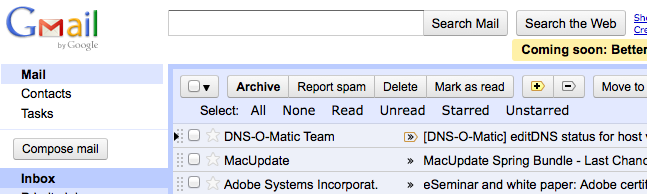
If you’re like me, you REALLY miss the ability to select all your unread (or read) conversations with one click. With the new Gmail interface, you have to first click the drop-down menu, the click the desired selection option. That’s one click too many IMO, and extra mouse mileage that’s wearing down the poor little thing.
But naturally, when the Internet has a problem, the Internet also has a solution.
Using some CSS, and the Stylish extension for Firefox, it’s possible to get the old links back, and they actually look even better than before.
@namespace url(<a href="http://www.w3.org/1999/xhtml">http://www.w3.org/1999/xhtml</a>);
/*
Gmail: Select "links" restored
*/
@-moz-document domain("mail.google.com") {
/* move search results text down below Select links */
.VP5otc-pzeoBf.D.E .yS { padding-top: 25px !important; }
/* same height as before (more or less) */
.VP5otc-pzeoBf.D.E .nH { height: 22px !important; }
.VP5otc-pzeoBf.D.E > .nH > .nH.Cq > div > div > .J-M.AW:nth-child(7) {
position: relative !important;
top: -4px !important;
left: 15px !important; /* line up with 'Search ...' */
display: inline !important;
height: 16px !important;
}
.VP5otc-pzeoBf.D.E > .nH > .nH.Cq > div > div > .J-M.AW:nth-child(7) > .SK:before {
content: "Select: " ; font-family: Arial ; color: black ;
}
.VP5otc-pzeoBf.D.E > .nH > .nH.Cq > div > div > .J-M.AW:nth-child(7) > .SK {
-moz-box-shadow: none !important;
-webkit-box-shadow: none !important;
padding-top: 4px !important;
padding-bottom: 2px !important;
background-color: transparent !important;
font-family: Verdana !important;
}
.VP5otc-pzeoBf.D.E > .nH > .nH.Cq > div > div > .J-M.AW:nth-child(7) > .SK.AX > .J-N {
display: inline-block !important;
padding-left: 8px !important;
padding-right: 8px !important;
-moz-border-radius: 3px !important;
-webkit-border-radius: 3px !important; /* WebKit */
cursor: pointer !important;
}
.VP5otc-pzeoBf.D.E > .nH > .nH.Cq > div > div > .J-M.AW:nth-child(7) > .SK.AX > .J-N:hover {
background-color:#406480 !important;
color:white !important;
}
/* optional bg: sort of a button look (dark/light bg with light/dark text) * /
.A1.D.E > .nH > .nH.Cq > div > div > .J-M.AW:nth-child(7) > .SK.AX > .J-N:not(:hover) {
background-color: #406480 !important;
} /* dark blue [Planets bg] */
} |
@namespace url(<a href="http://www.w3.org/1999/xhtml">http://www.w3.org/1999/xhtml</a>);
/*
Gmail: Select "links" restored
*/
@-moz-document domain("mail.google.com") {
/* move search results text down below Select links */
.VP5otc-pzeoBf.D.E .yS { padding-top: 25px !important; }
/* same height as before (more or less) */
.VP5otc-pzeoBf.D.E .nH { height: 22px !important; }
.VP5otc-pzeoBf.D.E > .nH > .nH.Cq > div > div > .J-M.AW:nth-child(7) {
position: relative !important;
top: -4px !important;
left: 15px !important; /* line up with 'Search ...' */
display: inline !important;
height: 16px !important;
}
.VP5otc-pzeoBf.D.E > .nH > .nH.Cq > div > div > .J-M.AW:nth-child(7) > .SK:before {
content: "Select: " ; font-family: Arial ; color: black ;
}
.VP5otc-pzeoBf.D.E > .nH > .nH.Cq > div > div > .J-M.AW:nth-child(7) > .SK {
-moz-box-shadow: none !important;
-webkit-box-shadow: none !important;
padding-top: 4px !important;
padding-bottom: 2px !important;
background-color: transparent !important;
font-family: Verdana !important;
}
.VP5otc-pzeoBf.D.E > .nH > .nH.Cq > div > div > .J-M.AW:nth-child(7) > .SK.AX > .J-N {
display: inline-block !important;
padding-left: 8px !important;
padding-right: 8px !important;
-moz-border-radius: 3px !important;
-webkit-border-radius: 3px !important; /* WebKit */
cursor: pointer !important;
}
.VP5otc-pzeoBf.D.E > .nH > .nH.Cq > div > div > .J-M.AW:nth-child(7) > .SK.AX > .J-N:hover {
background-color:#406480 !important;
color:white !important;
}
/* optional bg: sort of a button look (dark/light bg with light/dark text) * /
.A1.D.E > .nH > .nH.Cq > div > div > .J-M.AW:nth-child(7) > .SK.AX > .J-N:not(:hover) {
background-color: #406480 !important;
} /* dark blue [Planets bg] */
}
Thanks to Matt Kruse. Original script source: http://userscripts.org/topics/67827


 Comments (0)
 Themocracy