I have a few old reliable AR5005G (5212, PCI 168c:0013) cards, both MiniPCI and Cardbus from the heyday of Wireless-G back in the early ’00s. Back then, Atheros 500x series cards were THE cards to have if you wanted to have some fun with aircrack, or if you just wanted your WiFi to actually WORK, especially under Linux. The madwifi (aka ath_pci) drivers were probably the most stable wireless drivers at the time. Even on Windows, you could use 3rd party drivers to put the cards in monitor mode and capture packets.
Times have changed and madwifi has been superseded by ath5k (and indirectly ath9k).
For some reason I decided to install Ubuntu 12.04 on an old Fujitsu Lifebook (Pentium III 600MHz, upgraded 512MB RAM, ATI Mobility Radeon M4) without built-in wireless, using a Netgear WPN511 Cardbus adapter. I expected everything to work as it did in the old days, but for some reason the WiFi wouldn’t stay connected.
It seems the hardware encryption capabilites on the card don’t quite support WPA2/CCMP-AES, even though the ath5k driver says it does. So the solution is to disable hardware encryption support:
echo "options ath5k nohwcrypt=1" | sudo tee /etc/modprobe.d/ath5k.conf
Then reboot, or reload the ath5k module (modprobe -rv ath5k, modprobe -v ath5k).
Now I can enjoy my surprisingly not-extremely-slow 10-year old laptop wirelessly.
Source: http://ubuntuforums.org/showthread.php?p=12086356#post12086356
http://madwifi-project.org/
 Hardware, Linux, Software
|
Hardware, Linux, Software
|  ar5005, ar500x, ar5212, ath5k, atheros, disconnect, driver, encryption, linux, ubuntu, wifi, wireless, wpa, wpa2
Pretty rad.
Canon Rebel XSi, Canon EF 24mm f2.8 prime.
1/15, f2.8, ISO 800
5" f3.2 ISO 200
30" f6.3 ISO 200
30" f2.8 ISO 400
30" f2.8 ISO 1600
Some CF cards identify themselves as removable disks as opposed to fixed disks.
This poses a problem when using a CF card as the primary install drive for Windows, which will not enable DMA or pagefile on “removable” disks.
The solution is to force the driver for a Hitachi MicroDrive on the CF card. (Not the IDE controller)
xpfildrvr1224_320.zip
(File source: http://wayback.archive.org/web/*/http://home.graffiti.net/jaclaz:graffiti.net/Projects/USBXP/xpfildrvr1224_320.zip)
(Ref: http://www.thinkwiki.org/wiki/CompactFlash_boot_drive)
I was trying to get my Alix board to properly output audio. It has no VGA and no onboard sound card, so I’m using a USB to audio adapater. The card was detected, all appropriate snd- modules loaded according to lsmod, and it showed up in /proc/asound/cards. Problem is it was card1, and alsamixer and most programs use card0 by default.
It seems that Debian configures snd-usb-audio in /etc/modprobe.d/alsa-base.conf with the index=2 option to prevent it from being the primary card. To disable this behaviour, simply comment out the line.
Original answer:
So are you using a USB sound card as your audio device?It looks like you might have removed some audio device from your computer, that is why card0 is missing, where as usb card is configured as card1.
Edit /etc/modprobe.d/alsa-base.conf, include/modify the line for snd-usb-audio
snd-usb-audio index=0
This would update snd-usb-audio to card0, in case you want that as the first card.
via Debian User Forums • View topic – ALSA: cannot find card ‘0’.
If you have a “legacy” Intel chipset (and apparently legacy means anything not from the Core i era), the new AHCI/ATA driver Intel lists on their site (“Intel Rapid Storage Technology” ) isn’t compatible with older chipsets.
I have a few ICH7, ICH8 (also used for VirtualBox’s AHCI controller), ICH9, ICH10 and ESB2 southbridge chipsets and have found that the Intel Matrix Storage Manager 8.9 works.
I’ve attached the Windows installer, as well as the 64 and 32-bit “F6” floppy driver packages, because it seems Intel can’t be trusted to keep old versions of their drivers easily available.
Just noticed something today.
A few years ago I was living in residence at St. Paul University. The internet access there was managed by an access controller which redirected all new connections to wireless.colubris.com. After some investigation, I realized there was a way to work around the bandwidth limitations and session timeouts with the use of a DNS forwarder, a Web server, MAC address spoofing, a SOCKS proxy server software and a pseudo-keepalive tool, the ever-useful Firefox addon Reloadevery. This allowed for much more effective use of the available network connectivity.
Fast forward to the present, and I now find myself on the other side. We now have installed our own HP ProCurve access controller, technology which HP acquired through the purchase of Colubris Inc.
so, wireless.colubris.com, we meet again. Things look different from this side.
Update: Just went and exchanged the HD 6450 for an HD 6670. This one works great, runs Starcraft II on High and doesn’t crash the machine!
After some discussion with a coworker, I decided to try putting a Sapphire Radeon HD6450 into my Mac Pro, since the 8800GT was a real power hog and heater.
Just my luck that today the 10.6.8 update was released, containing – you guessed it – HD6xxx drivers!
So I ran the update, then popped in the HD6450, and what do you know, it works! Only two problems: First, no EFI support which means no boot screen (white/grey apple). Second, it seems to crash when launching any game. I tried Lord of the Rings: Return of the King and Starcraft II, and both caused the screen to go blank and kernel panic.
Anyway, nice experiment, and at least it works for regular desktop work….
For anyone interested, here are all the Radeon HD6000 series cards supported by the 10.6.8 kexts, IDs and names.
- 0x67681002 CAICOS 6450M
- 0x67701002 NI CAICOS [AMD Radeon HD 6400 Series]
- 0x67791002 NI Caicos [AMD RADEON HD 6450]
- 0x67601002 NI Seymour [AMD Radeon HD 6470M]
- 0x67611002 NI Seymour [AMD Radeon HD 6430M]
- 0x67501002 Turks [AMD Radeon HD 6500 series]
- 0x67581002 Turks XT [AMD Radeon HD 6600 Series]
- 0x67591002 NI Turks [AMD Radeon HD 6500]
- 0x67401002 Whistler XT [AMD Radeon HD 6700M Series]
- 0x67411002 NI Whistler [AMD Radeon HD 6600M Series]
- 0x67381002 Barts XT [ATI Radeon HD 6800 Series]
- 0x67391002 Barts PRO [ATI Radeon HD 6800 Series]
- 0x67201002 Blackcomb [AMD Radeon HD 6900M Series]
- 0x67221002 ATI Radeon HD 6950
- 0x67181002 Cayman XT [AMD Radeon HD 6900 Series]
Bought a cheap USB multi card reader the other day. Tried it on my Ubuntu netbook and it worked great. However, today I tried to use it on my Windows 7 PC and it wasn’t detected. Opening the device manager revealed that no card reader had been detected, however a new “eHome Infrared Receiver (USBCIR)” was detected with an error.
The solution is to right-click the device, choose Update Driver, and force the “USB Composite device” driver.
Hello,
This is a message for the commenter “WC from Bristow” who posted a review of Mac OS X Snow Leopard on the Apple Store website on Decemer 11, 2010 (review posted below for SEO/reference).
I just wanted to let you know that your MacBook Pro is DEFECTIVE. I hope that by some strange chance you might read this before your warranty expires. There is a known issue with the GeForce 9400M graphics chips in the original unibody MacBooks with removable battery. There is random screen flickering. This is a hardware issue, and no matter what you do will not go away. If your laptop is still under warranty, and even if it’s not, take it back to Apple and demand a replacement. They will probably swap it for a new, current-generation MacBook.
Just a friendly suggestion from someone who went through the same frustration.
Not Impressed
- Written by WC from Bristow
- 11-Dec-2010
Snow Leopard brought some serious problems. Mail will chew up 50 to 75% of the processor just idling. Flashing video/screen on MacBook Pro 15″ when on low power video card setting causes me to run all the time in high performance mode so it does not flash… and now my battery lasts for an hour and a half if I am lucky. (in part because of the processor overloading of Mail). This adds 2 lbs+ to the laptop because I must now carry two extra batteries (and I do).
I spend a lot of time in Mail… and bugs like copying the email address and getting a bunch of extra garbage that needs to be trimmed after pasting is aggravating. Dock lockups, Browser lockups. Spinning beach ball of death with much greater frequency than normal Leopard. At points cascading chronic app crashing which is “cured” by rebooting the machine (a la Windows)
Hope that Lion brings some relief. Snow Leopard has fleas.
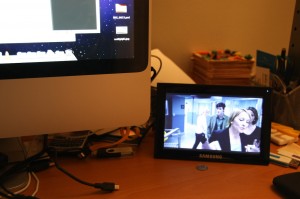
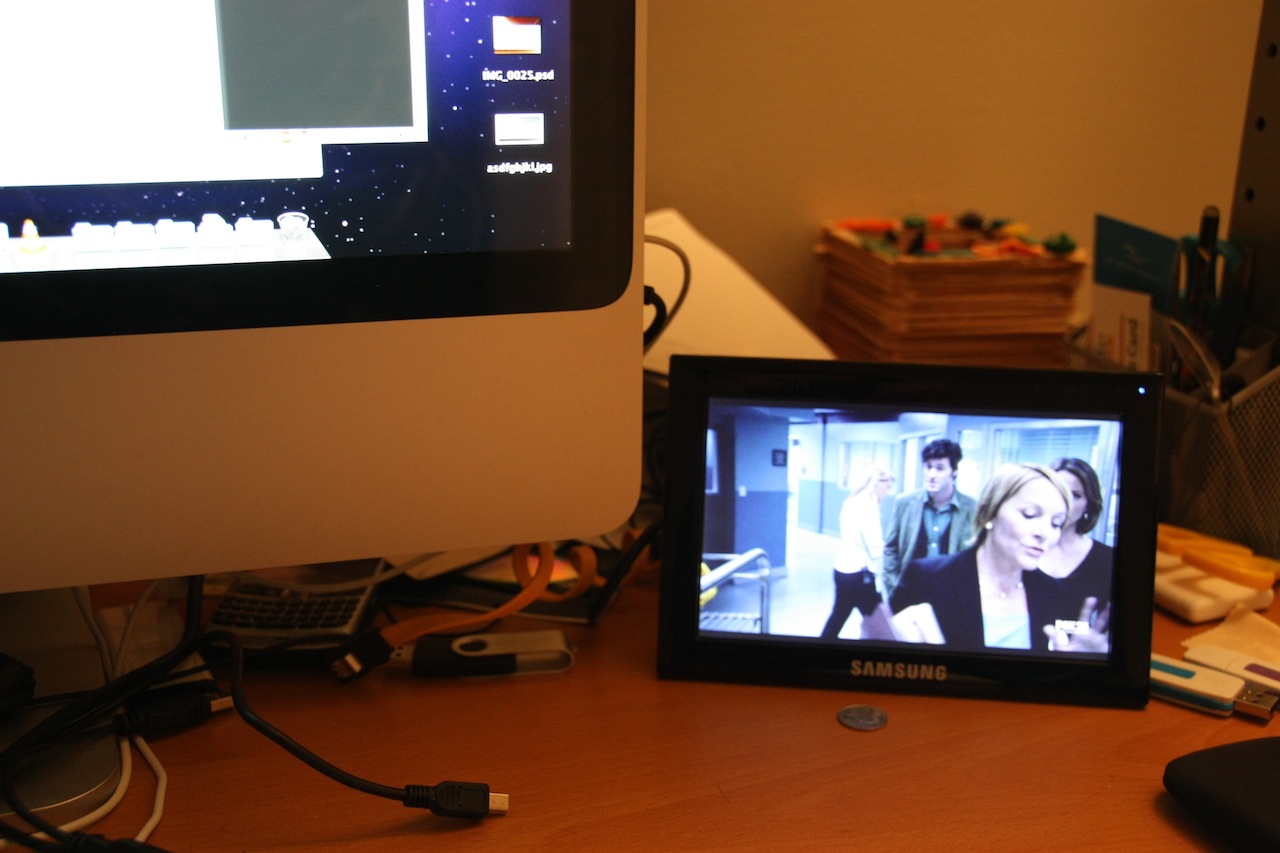
Just got a Samsung U70 USB monitor.
The U70 is very simple to set up. Just install the drivers, and then plug and play.
Drivers are available for Windows, Mac and Linux. Performance is OK, can even display 3D graphics and HD video on it, although that causes very high CPU usage.
Build quality is good; packaging and instructions are in Korean. Comes with a double-USB cable, but in my experience only one is needed to power the monitor.
Screen quality is not the best, brightness is not quite uniform. However, the picture is very sharp and brightness and viewing angle are quite good.
I have tested with Mac, Linux and Windows, and it works great with all 3. Handy if you just need a little space to throw your music player, IM contact list, or have a video or other monitoring service running in sight all the time.
It’s a tiny little 7″ monitor, of “Slugterm” fame. There are a lot of things that can be done with this little gadget, perhaps a dual-monitor Nexus One setup? Check out Sven Killig’s website for inspiration.
For now I’m content with using it to watch videos while working.


 Comments (0)
 Themocracy